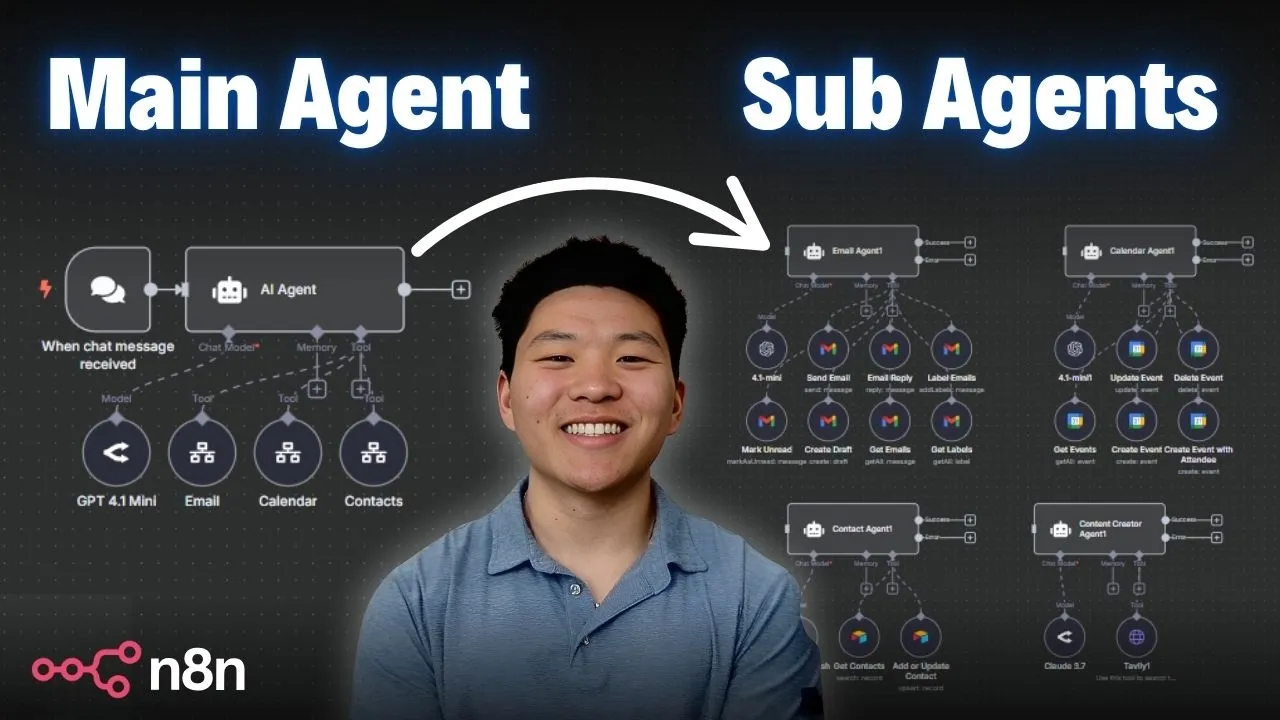
This article's core techniques stem from extensive practical experience in AI workflow automation. After testing numerous configurations and iterating through various approaches, this guide distills an optimal strategy that combines efficiency with robust reliability for building multi-agent systems.
Introduction to Multi-Agent AI Systems
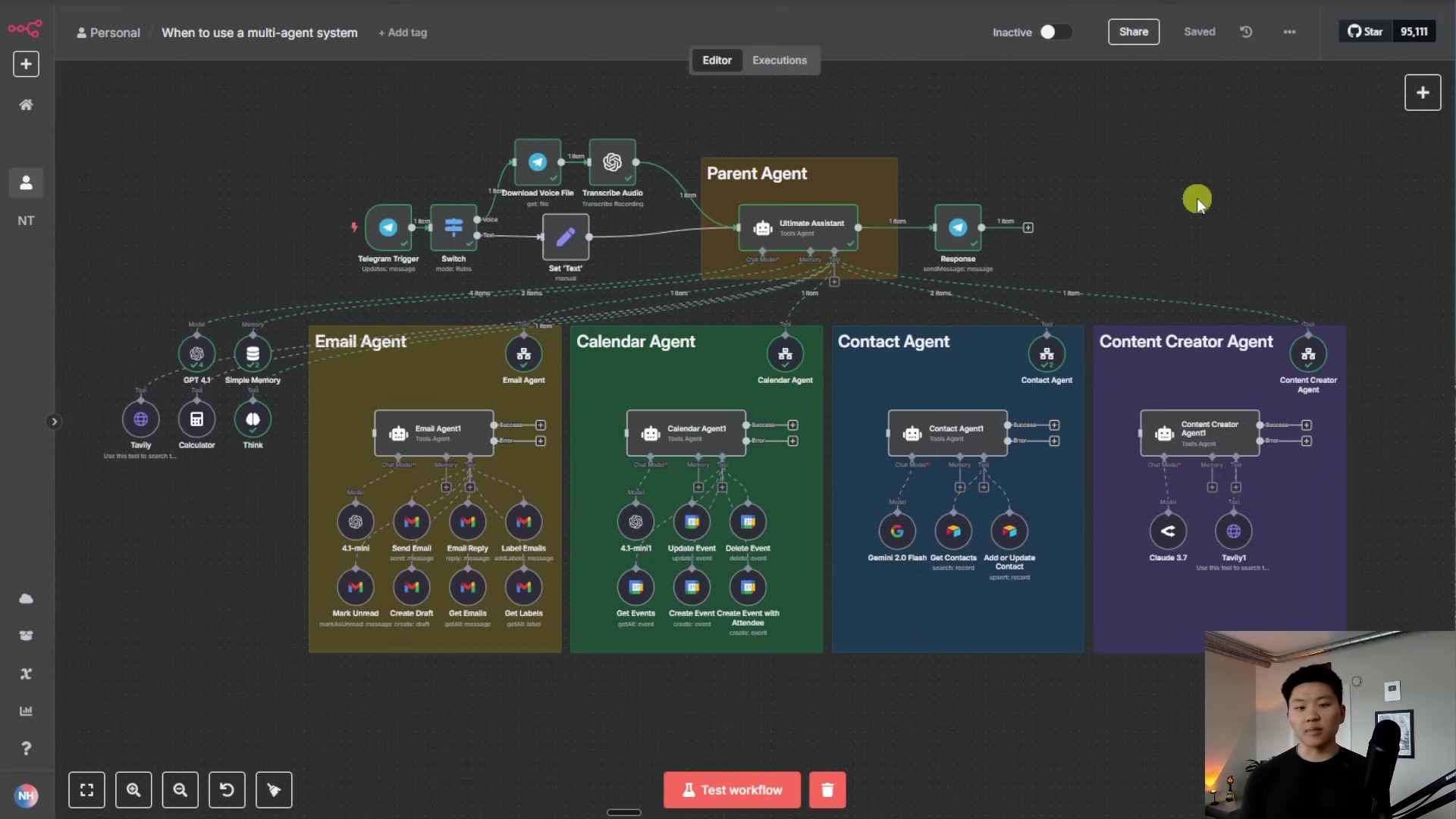
Multi-agent systems are designed to tackle complex tasks by employing multiple autonomous AI agents that collaborate, communicate, and utilize shared tools. This distributed approach contrasts sharply with single-agent systems, which can become overwhelmed by multifaceted requests. The orchestrator architecture is a prominent type of multi-agent system where a central 'parent agent' intelligently delegates tasks to specialized 'child agents'.
Imagine asking an AI system to simultaneously write a blog post, schedule a dinner event, and send an email. A single agent might struggle with the complexity and diverse tool requirements. However, in an orchestrator model, the parent agent's sole purpose is to understand the user's intent and then determine which specialized sub-agents (e.g., content creator, calendar, email) need to be invoked to achieve the overall goal.
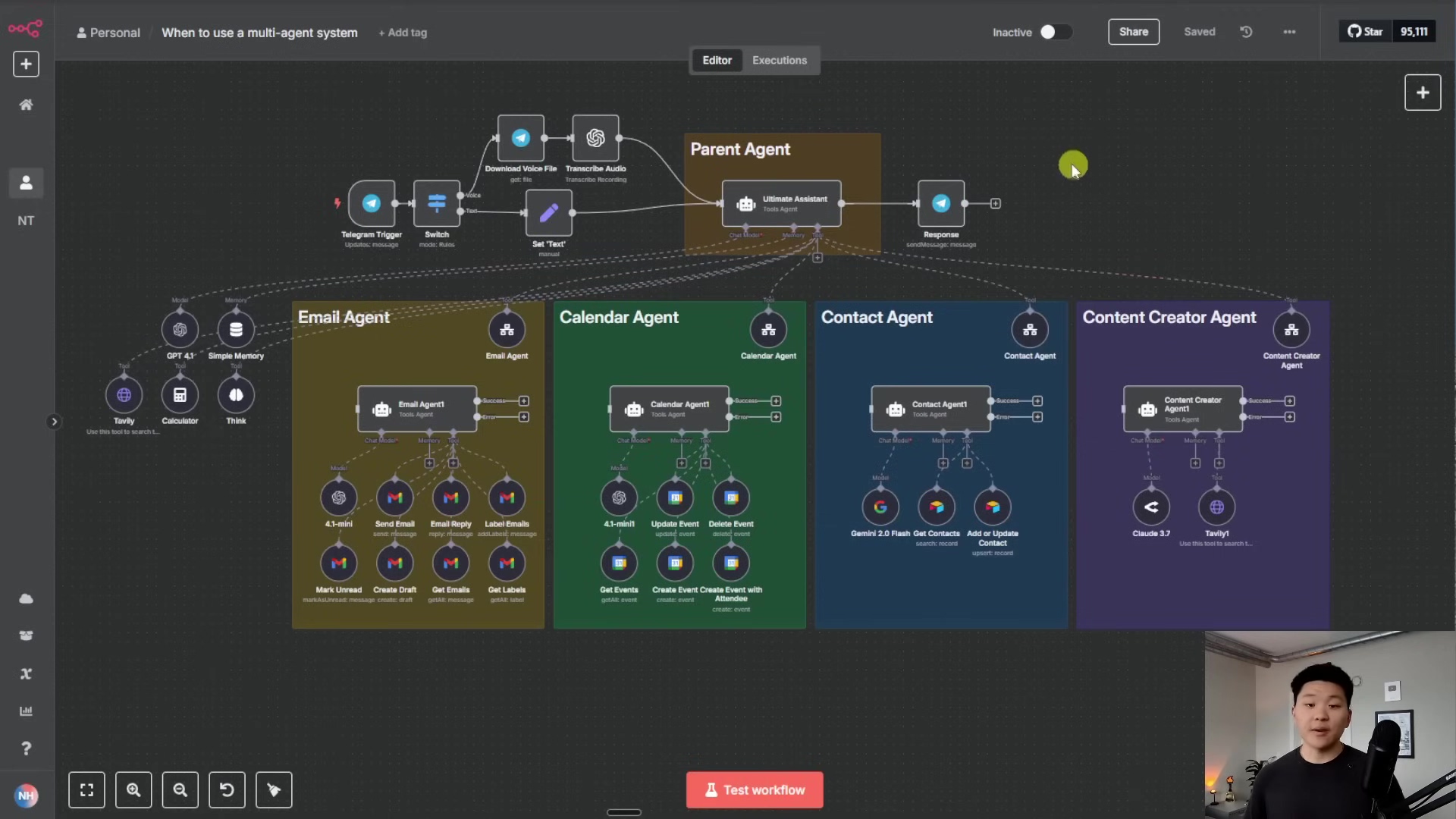
This specialization significantly enhances accuracy and efficiency. For instance, a complex query might involve a contact agent to retrieve recipient information, a content creator agent to draft the blog post, a calendar agent to manage events, and an email agent to send the final communication.
Advantages of Multi-Agent Architectures
The benefits of adopting a multi-agent system, especially with an orchestrator architecture, are manifold:
- Reusable Components: Once a specialized agent (like an email agent or a content creator agent) is built, it can be easily integrated into various workflows, promoting modularity and reducing development time.
- Model Flexibility: Different agents can be configured with different AI models tailored to their specific tasks. For example, a more cost-effective model like Flash might be used for contact retrieval, while a more powerful, albeit expensive, model like Claude 3.7 could be reserved for complex content generation.
- Easier Debugging and Maintenance: By breaking down complex tasks into smaller, specialized units, identifying and fixing issues becomes significantly simpler. Debugging a focused agent is far less daunting than troubleshooting a monolithic system trying to handle everything.
- Clearer Prompt Logic and Better Testability: Each agent receives a highly specific prompt, reducing ambiguity and improving the predictability of its responses. This also makes individual components easier to test in isolation.
- Foundation for Multi-Turn Agents and Agent Memory: Multi-agent systems can maintain context and memory across different sub-workflows, enabling more sophisticated, multi-step interactions without losing track of the conversation or task progression.
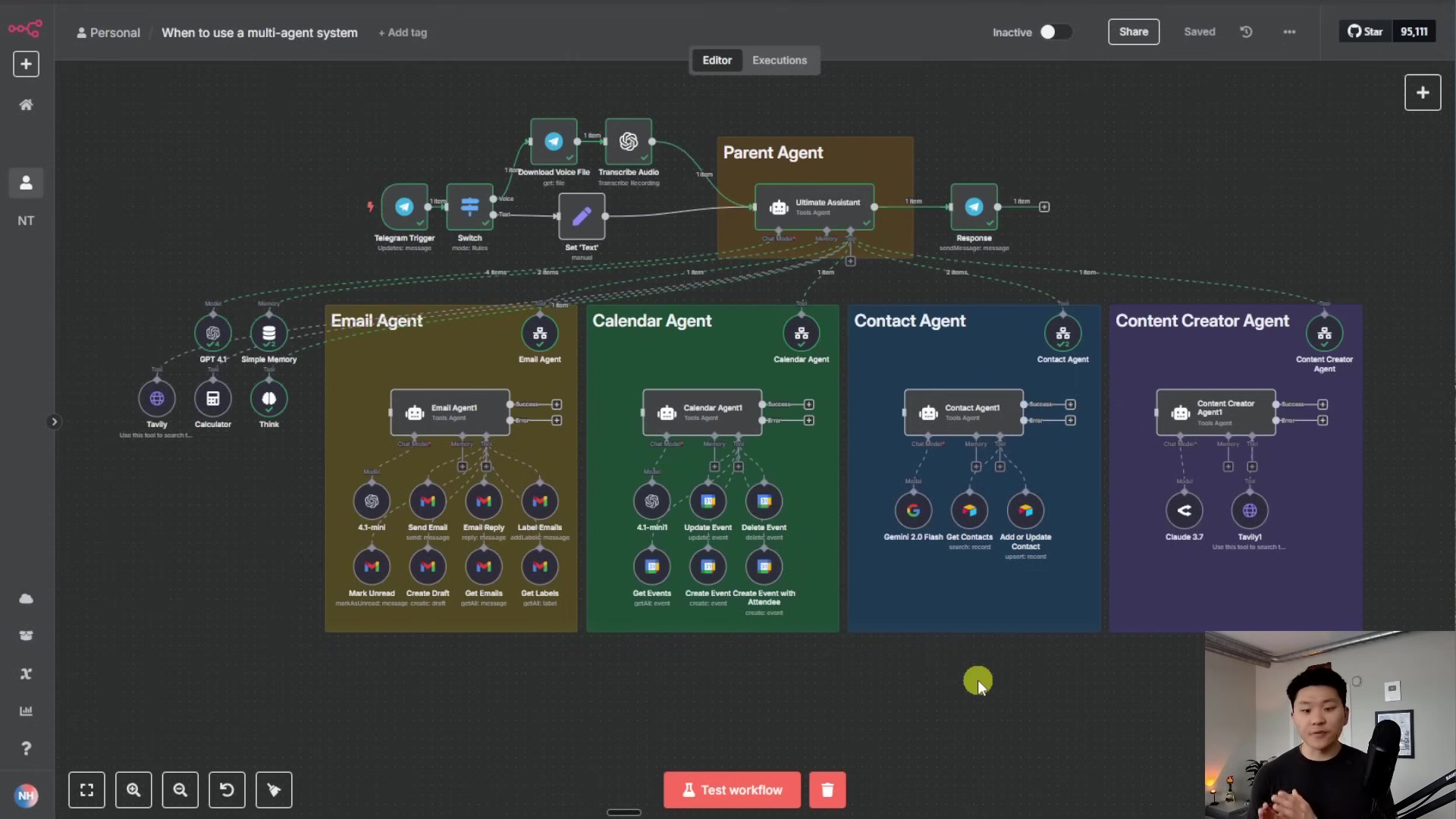
When to Implement a Multi-Agent System
While multi-agent systems offer significant advantages, they are not always the optimal solution. Forcing a multi-agent orchestrator framework into a process that could be handled by a simple single agent or a basic AI workflow can introduce unnecessary complexity, increase latency due to more API calls, raise costs, and potentially introduce more points of error. The golden rule is to minimize data transfer between workflows where possible. However, for functions requiring dedicated, specialized agents, this architecture proves invaluable.
Building an Orchestrator Agent in n8n
Let's walk through the process of setting up a simple orchestrator agent that can call on a sub-agent in n8n.
Core Orchestrator Setup
First, we'll establish the main orchestrator agent. In n8n, this begins by adding an 'AI Agent' node.
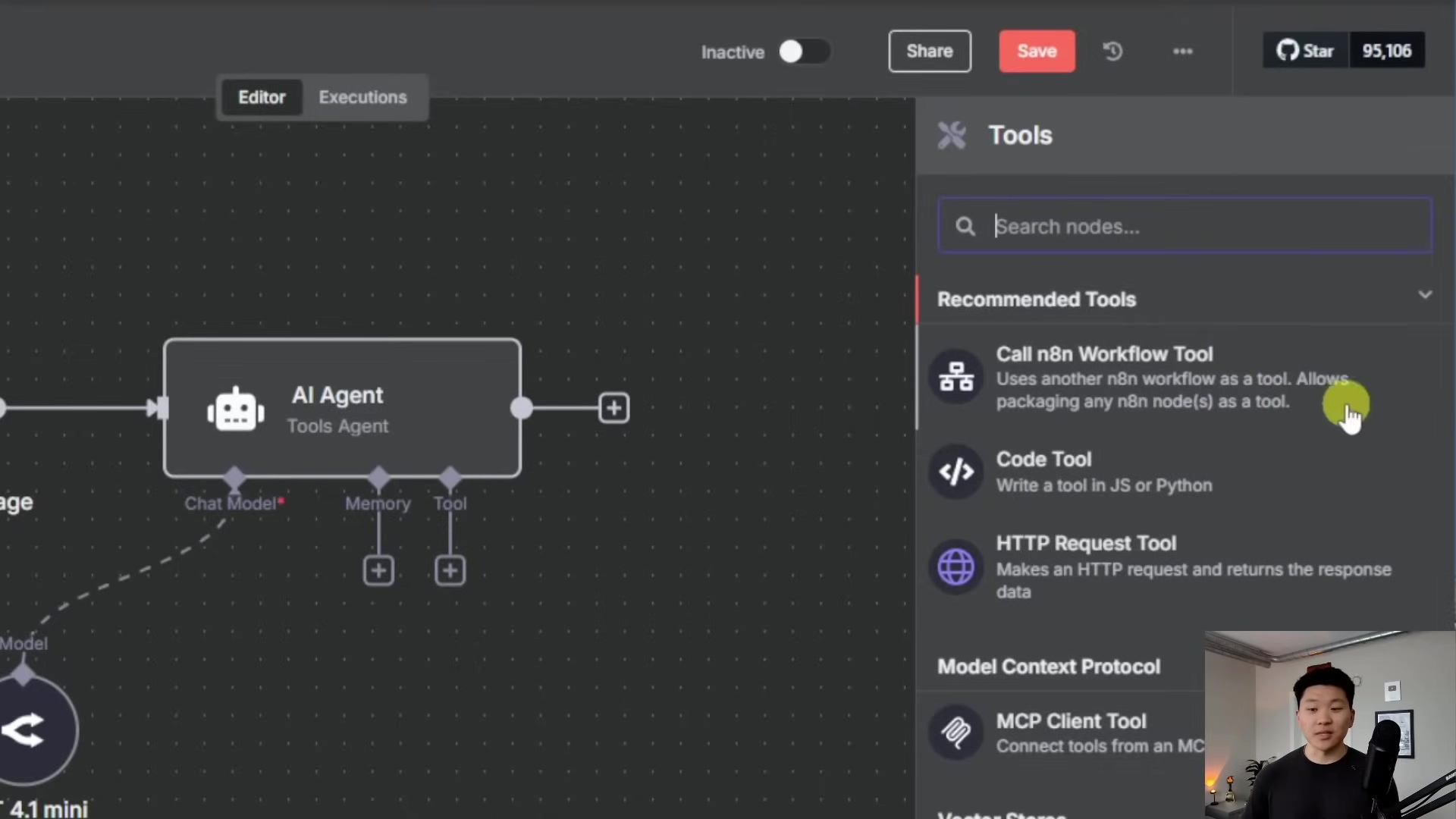
Connect a 'Chat Model' (e.g., 4.1 mini) to provide the AI agent with its processing capabilities. The orchestrator agent will primarily interact via a chat window for initial testing.
Connecting to a Sub-Workflow Tool
To enable the orchestrator agent to delegate tasks, it needs to call other n8n workflows as tools. This is achieved by adding a 'Call n8n Workflow Tool'. This tool acts as a bridge, allowing the main agent to send data to and receive responses from specialized sub-workflows.
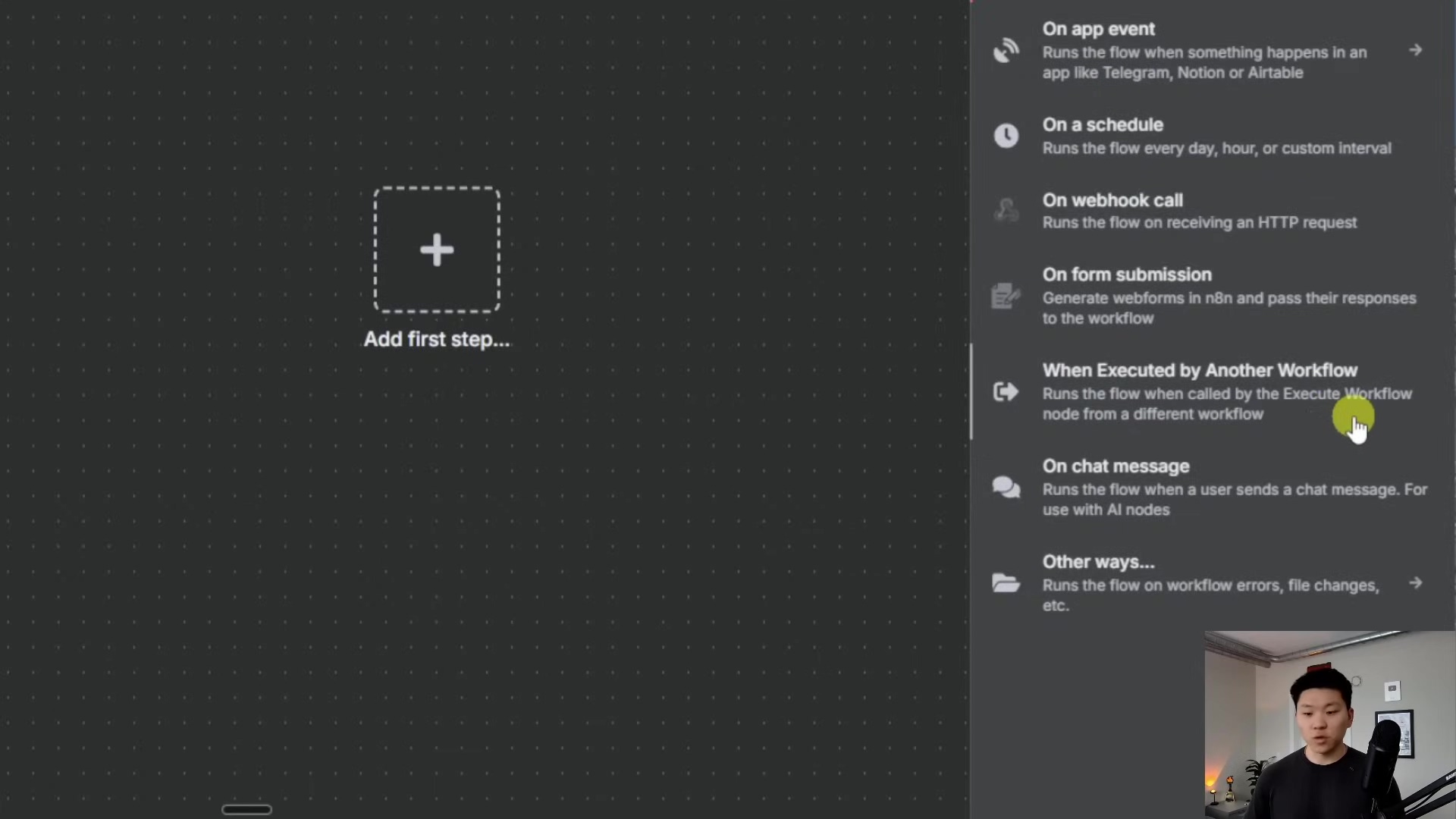
When configuring the 'Call n8n Workflow Tool' for an 'Email Agent', a clear description is essential for the orchestrator to understand when to use it (e.g., "Call this tool to take any email actions"). The sub-workflow should be named descriptively (e.g., "Sub Agent"). Initially, configure the sub-workflow to 'accept all data' to simplify input mapping.
Refining Agent Prompts
One of the most critical aspects of multi-agent systems is precise prompting. The orchestrator agent's system prompt should clearly define its role, which is primarily to delegate tasks rather than perform them directly. For example, a prompt might state:
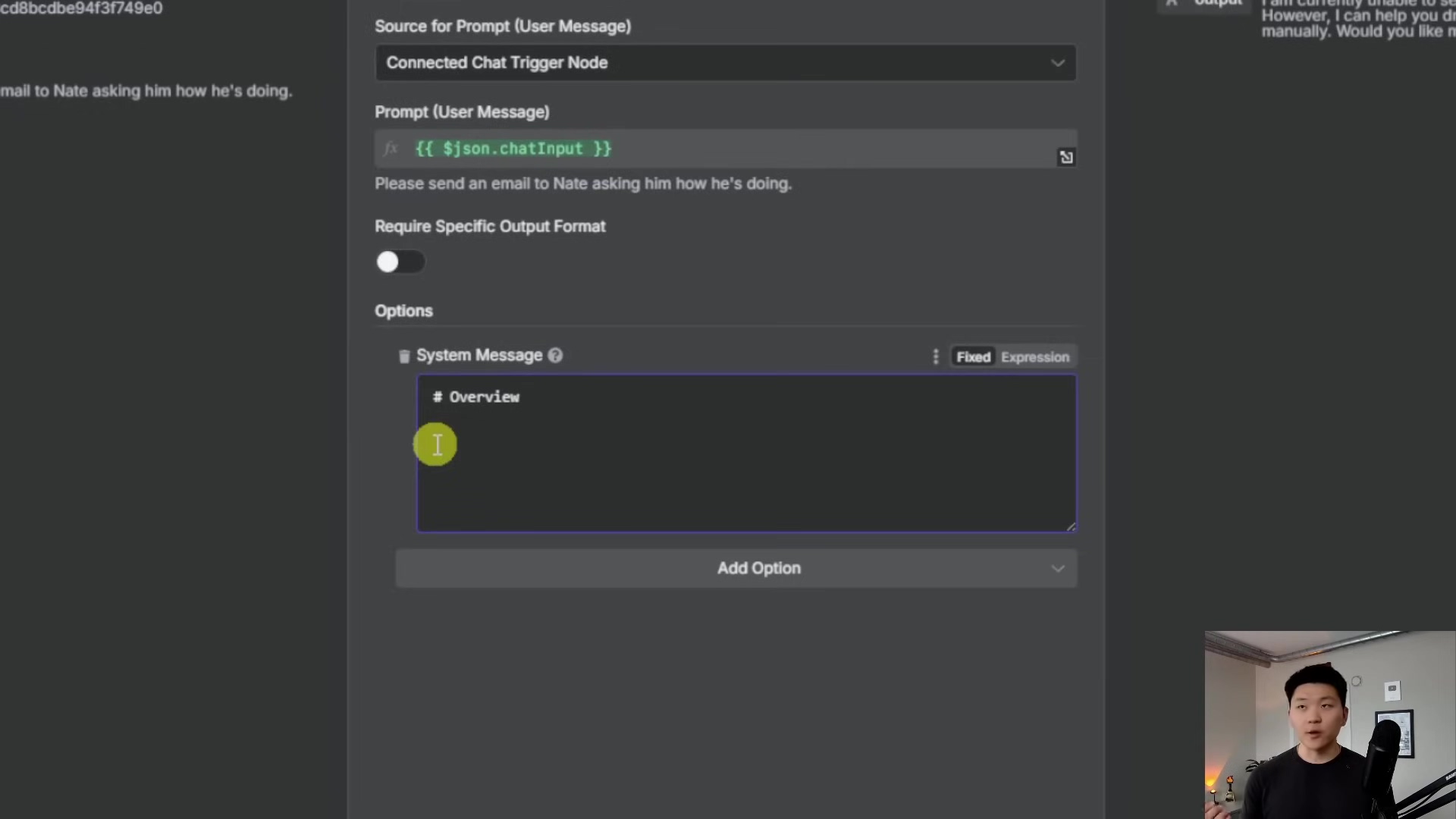
"Overview: You are an orchestrator agent. Your only job is to delegate the task to the correct tool. No need to write emails or create summaries."
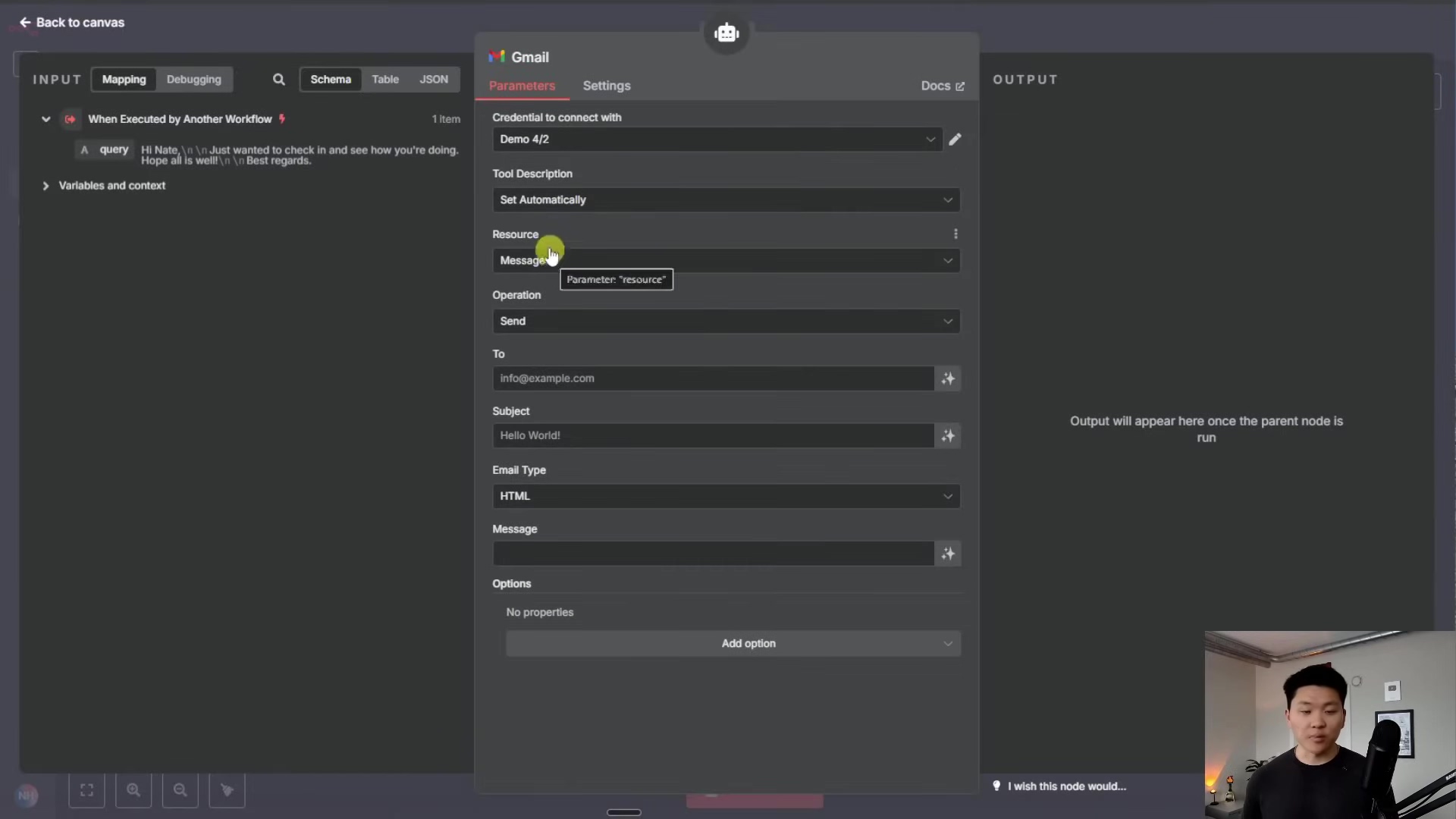
This prevents the orchestrator from attempting to generate email content itself and instead directs it to pass the request to the designated email agent. Similarly, the sub-agents should have their own specific prompts and tools. For an email agent, this would include a 'Gmail' node configured to 'send message'.
Debugging and Iteration
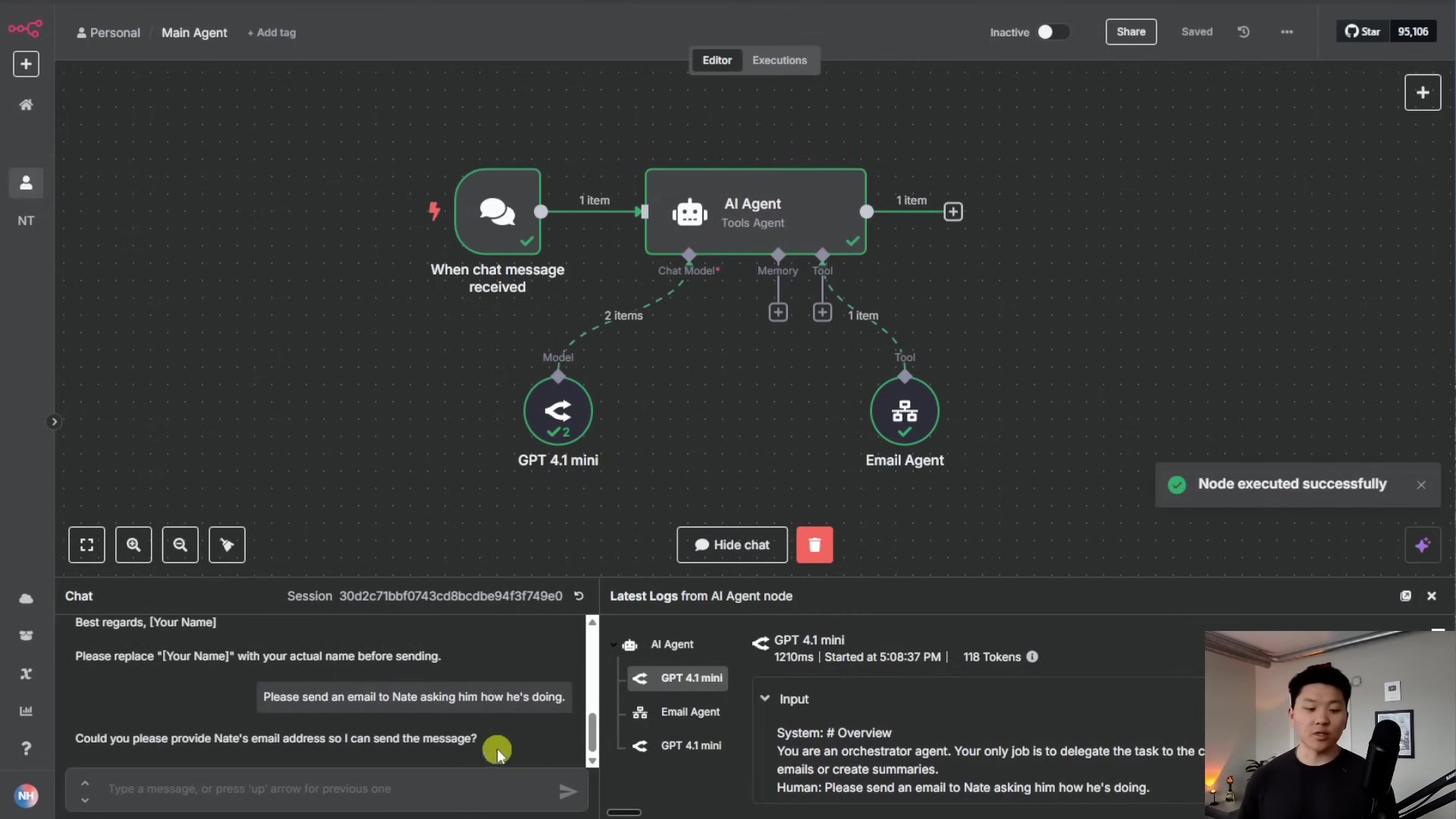
Building multi-agent systems often involves iterative refinement. When an agent behaves unexpectedly, examining the execution logs is crucial. These logs show which tools were called, the inputs provided, and the outputs received, helping to pinpoint where the logic might be flawed.
For example, if the orchestrator tries to send an email directly instead of delegating, or if a sub-agent requests missing information (like an email address), the logs will reveal this. You can also test sub-workflows independently by providing mock data to their 'Execute Workflow Trigger' to ensure they function correctly before reintegrating them into the main orchestrator flow.
Expanding Capabilities with Additional Tools
Once the core delegation mechanism is functional, you can add more specialized tools to your orchestrator agent. For instance, to retrieve contact information, you could integrate an 'Airtable Tool' that searches your contact database. This allows the orchestrator to dynamically fetch necessary data for its sub-agents.
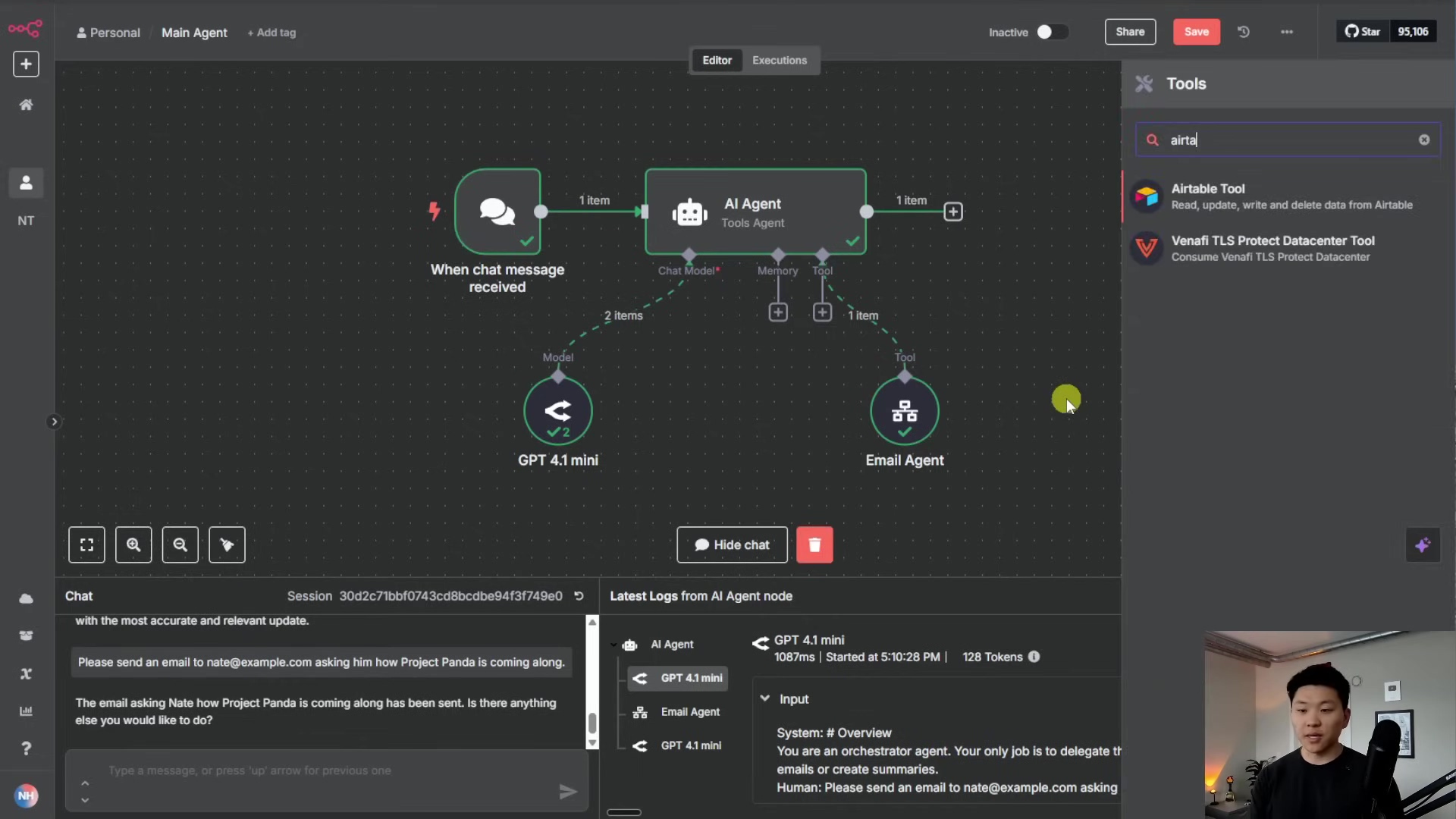
The intelligence of these models is remarkable; even without explicit instructions in the system prompt about when to use each tool, they can often infer the correct usage based on the tool's description. This highlights the power of a well-defined toolset in an orchestrator architecture.
Required Resources and Cost-Benefit Analysis
Building multi-agent systems, particularly with no-code platforms like n8n, requires certain resources. Here's a breakdown:
Resource Checklist
| Category | Item | Description | Estimated Cost (Monthly) |
|---|---|---|---|
| Platform | n8n (Self-Hosted) | Open-source workflow automation platform | $0 (plus hosting) |
| n8n (Cloud) | Managed n8n service with various tiers | $20 - $200+ | |
| AI Models | OpenAI API Key | Access to GPT-4, GPT-3.5, etc. | Usage-based |
| Anthropic API Key | Access to Claude models (e.g., Claude 3.7, Flash) | Usage-based | |
| Gemini API Key | Access to Google's Gemini models | Usage-based | |
| Tools/Integrations | Gmail Account | For email sending capabilities | Free |
| Airtable Account | For contact management/database integration | Free - $50+ | |
| Calendar Service (e.g., Google Calendar) | For event scheduling | Free | |
| Technical Skills | Basic Logic & Workflow Design | Understanding of data flow and automation principles | Time investment |
| Prompt Engineering | Crafting effective instructions for AI agents | Continuous learning |
Cost-Benefit Comparison: DIY vs. Commercial AI Solutions
| Feature | DIY Multi-Agent System (n8n) | Commercial AI Automation Platform |
|---|---|---|
| Initial Cost | Low (self-hosted) to Medium (cloud) | Medium to High |
| Operational Cost | Usage-based (API calls) + Hosting | Subscription-based (tiered) + Usage-based |
| Flexibility/Customization | High (full control over agents, prompts, tools) | Moderate (limited to platform features) |
| Scalability | High (can scale with infrastructure) | Varies by platform tier |
| Complexity | Moderate (requires understanding workflow logic) | Low to Moderate (user-friendly interfaces) |
| Control over Data | High (data processed within your environment) | Varies (depends on vendor's privacy policy) |
| Debugging | Clear logs, but requires manual analysis | Often simplified, but less transparency |
| Maintenance | Requires ongoing management and updates | Managed by vendor |
Critical Best Practice Tips for Multi-Agent Systems
⚠️ Start Small: Begin with a simple orchestrator and one sub-agent. Validate each component before adding complexity.
💡 Define Clear Roles: Each agent should have a distinct, specialized function. Avoid overlapping responsibilities unless intentionally designed for failover or redundancy.
⚠️ Monitor Costs: AI model usage can accumulate. Regularly review API call logs and model choices to optimize expenses, especially for frequently used agents.
💡 Version Control Workflows: As your systems grow, use n8n's versioning (or external tools) to track changes and revert if necessary.
Key Takeaways
- Specialization is Key: Breaking down complex tasks into smaller, specialized AI agents significantly improves efficiency, accuracy, and maintainability.
- Orchestrator Role: The central orchestrator agent acts as a smart router, delegating tasks to the appropriate sub-agents based on user intent.
- No-Code Power: Platforms like n8n empower users to build sophisticated multi-agent systems without extensive coding knowledge.
- Iterative Development: Building these systems is an iterative process involving setup, testing, debugging, and refining prompts and tool integrations.
- Strategic Application: While powerful, multi-agent systems are best suited for complex, multi-faceted tasks, rather than simple automations that a single agent could handle.
Conclusion
Multi-agent systems, particularly those built with an orchestrator architecture on platforms like n8n, represent a powerful paradigm shift in AI automation. By intelligently distributing tasks among specialized AI agents, we can tackle previously intractable problems and achieve remarkable levels of efficiency and accuracy. This approach not only streamlines complex workflows but also fosters a modular, scalable, and maintainable automation ecosystem.
When considering implementing such a system, it's crucial to align the architecture with your specific end goal and future evolution plans. While the initial setup might require careful planning and iterative refinement, the long-term benefits in terms of reusability, flexibility, and simplified debugging are substantial. If you're looking to elevate your automation capabilities and embrace the next generation of AI-driven solutions, diving into multi-agent systems is a highly rewarding endeavor.
Now, armed with this knowledge, consider how multi-agent systems can transform your own complex workflows. Share your thoughts and experiences in building AI automation systems below!